Understanding Concurrency, Threads, and the Node.js Event Loop
One of the biggest misconceptions about Node.js is that it's single-threaded, so it can only do one thing at a time.
While JavaScript executes on a single main thread, Node.js can handle thousands of concurrent connections efficiently. It achieves this through the combination of the Event Loop, libuv, and a background thread pool.
Before understanding how Node.js works internally, we first need to understand how modern operating systems execute programs.
From One Program to Many
In the early days of computing, a computer could only execute one program at a time.
Imagine opening a calculator. While the calculator was running, no other application could execute until it finished.
This was obviously inefficient.
Modern operating systems such as Windows, Linux, and macOS introduced multitasking, allowing multiple applications to run simultaneously.
Today you can:
- Listen to Spotify
- Browse the web
- Write code in VS Code
- Download files
- Join a video meeting
—all at the same time.
This is possible because the operating system manages processes and threads.
Process vs Thread
A process is an independent running application.
For example:
- Google Chrome
- Visual Studio Code
- Spotify
- Discord
Each process owns its own:
- Memory
- Resources
- Execution environment
If one process crashes, the others usually continue running because they're isolated from each other.
Inside every process are one or more threads.
A thread is the smallest unit of execution managed by the operating system.
Operating System
│
├── Chrome Process
│     ├── Thread
│     ├── Thread
│     └── Thread
│
├── Spotify Process
│     ├── Thread
│     └── Thread
│
└── Node.js Process
      ├── Main Thread
      └── Worker Threads
Unlike processes, threads inside the same process share memory, making communication between them much faster. Threads share the same memory within a process, making communication much faster than communication between separate processes.
Why Do We Need Multiple Threads?
Imagine you're driving while talking to your parents on the phone.
You're performing multiple activities during the same period.
Computers work similarly.
Without multiple threads, every operation would have to wait for the previous one to finish.
Read File
↓

Query Database
↓

Download Image
↓

Send Response
This is called sequential execution.
While simple, it wastes time whenever the program is waiting for external resources such as files or network requests.
Synchronous vs Asynchronous Programming
JavaScript supports two execution styles.
Synchronous (Blocking)
Every statement must finish before the next one begins.
const file = fs.readFileSync("users.json");

console.log(file);
The JavaScript thread waits until the file has been completely read.
Nothing else can execute during this time.
Asynchronous (Non-Blocking)
Instead of waiting, Node.js delegates long-running operations to the operating system or libuv.
fs.readFile("users.json", (err, file) => {
    console.log(file);
});

console.log("Application continues...");
Output:
Application continues...

(users.json finishes later)
The program keeps executing while the file is being read.
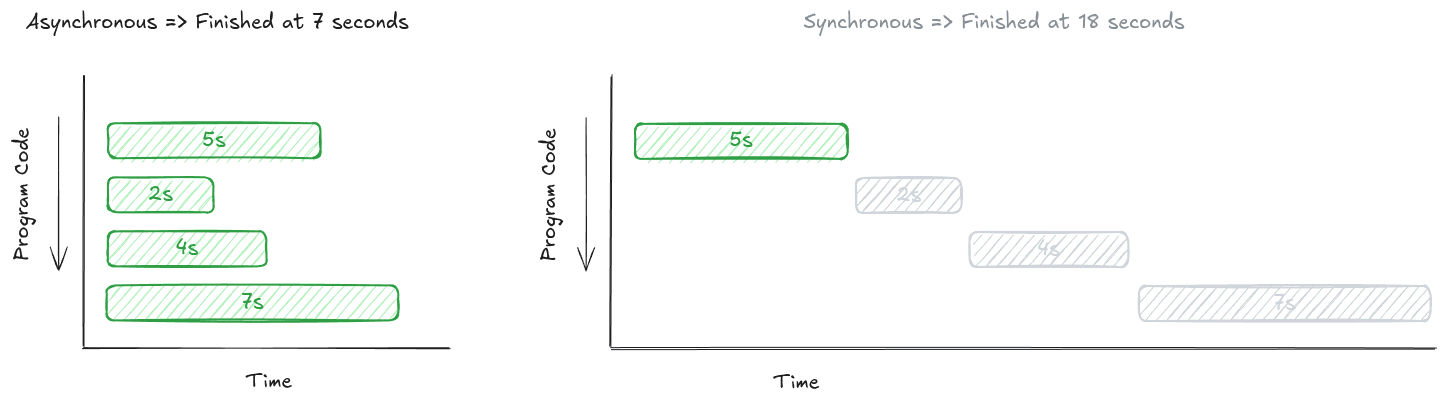
Figure 2. Synchronous code blocks execution, while asynchronous code allows other work to continue.
Concurrency vs Parallelism
These two terms are often used interchangeably, but they describe different concepts.
Concurrency
Multiple tasks make progress during the same period.
Task A ─────────────┐
                    ├── Time
Task B ─────────────┘
The tasks overlap.
Parallelism
Multiple tasks execute at exactly the same time on different CPU cores.
CPU Core 1 → Task A

CPU Core 2 → Task B
Parallel execution requires multiple processing units.
Node.js focuses primarily on concurrency, although some operations performed by libuv can execute in parallel.
The Thread Pool
If JavaScript runs on one thread, who performs operations such as:
- Reading files
- DNS lookups
- Compression
- Encryption
- Some database drivers
The answer is libuv's Thread Pool.
Creating a new thread for every task would be expensive.
Instead, Node.js maintains a reusable pool of worker threads.
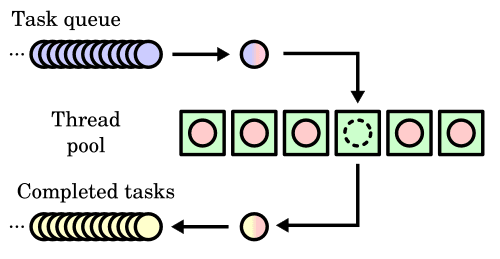
Figure 3. Long-running operations are delegated to reusable worker threads managed by libuv.
By default, Node.js creates four worker threads, although this number can be configured.
Instead of continuously creating and destroying threads, existing workers are reused.
This greatly reduces overhead.
What Happens When All Threads Are Busy?
Suppose your application receives ten expensive tasks simultaneously.
Worker 1 → Busy

Worker 2 → Busy

Worker 3 → Busy

Worker 4 → Busy

Task 5
Task 6
Task 7
...
The remaining tasks wait in a queue.
As soon as one worker finishes, it immediately starts processing the next queued task.
This prevents the operating system from creating an unlimited number of threads and protects the machine from excessive resource usage.
Node.js Architecture
At a high level, Node.js separates JavaScript execution from asynchronous operations.
The architecture can be summarized like this:
JavaScript Code
        │
        ▼
   Event Loop
        │
        ▼
      libuv
        │
        ├── Thread Pool
        ├── File System
        ├── Network
        └── Operating System
The JavaScript thread coordinates work while libuv performs many of the asynchronous operations behind the scenes.
The Event Loop
The Event Loop is the heart of Node.js.
Its responsibility is surprisingly simple:
- Execute JavaScript code.
- Check whether asynchronous operations have completed.
- Execute callbacks for completed tasks.
- Repeat forever.
Think of the Event Loop as a receptionist.
Instead of performing every task personally, it delegates work to specialists.
When those specialists finish, they notify the receptionist, who then informs the appropriate person.
This design allows a single JavaScript thread to coordinate thousands of concurrent operations efficiently.
Why Is This Important?
Imagine an API receiving 5,000 HTTP requests.
Each request needs to:
- Query a database
- Read files
- Call another API
If every request blocked while waiting for I/O, the server would spend most of its time doing absolutely nothing.
Instead, Node.js delegates those waiting operations to the operating system and continues accepting new requests.
This architecture makes Node.js particularly well suited for:
- REST APIs
- GraphQL servers
- WebSocket applications
- Chat applications
- Streaming services
- IoT platforms
- Robotics middleware
These applications spend much more time waiting for external resources than performing heavy CPU calculations.
Key Takeaways
- A process is an independent running application.
- A thread is the smallest unit of execution within a process.
- Synchronous code blocks execution until it completes.
- Asynchronous code allows other work to continue while waiting.
- Concurrency and parallelism are different concepts.
- Node.js relies on libuv and a reusable thread pool for many asynchronous operations.
- The Event Loop coordinates completed tasks and keeps JavaScript responsive.
- Although JavaScript executes on a single main thread, Node.js is designed to handle highly concurrent workloads efficiently.
Understanding these concepts provides a strong foundation for learning Promises, Async/Await, Streams, Worker Threads, and building scalable Node.js applications.
References
- Programmer Zaman Now — Tutorial Node.js Dasar
- Node.js Documentation — Event Loop, Timers, and
process.nextTick() - libuv Documentation
- CS50 — Lecture 0: Computational Thinking
- Martin Kleppmann — Designing Data-Intensive Applications